What is Wallspace?
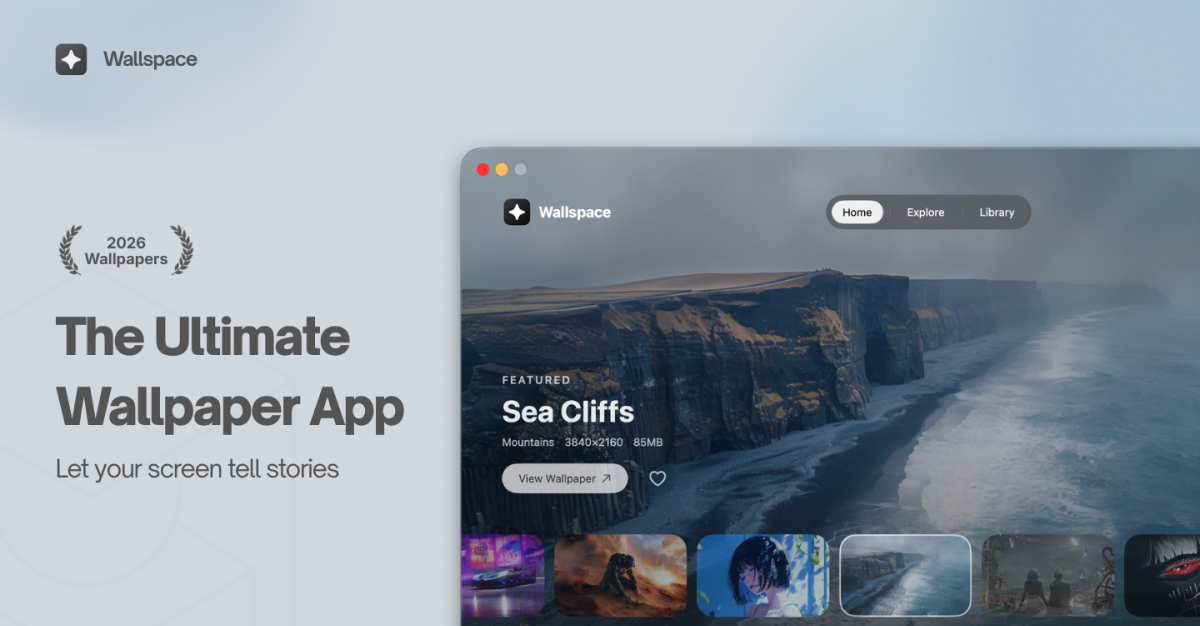
Wallspace is a native Mac live wallpaper app for people who want a moving desktop without account setup or a subscription. Users pick from a growing gallery, set different wallpapers per display, or choose an MP4 from their Mac. It is built in Swift, requires macOS 15.0 or later, and can also be installed with Homebrew.
Why Wallspace works
Live wallpapers often make the desktop feel heavier before they make it feel more personal. Wallspace keeps the moving parts native, account-free, and light on CPU, so the wallpaper behaves like part of macOS instead of another app competing for attention.
Wallspace features
- Light live motion. Wallspace is built natively in Swift and lists under 2 percent CPU usage, with playback that pauses when the Mac is on battery or running intensive tasks.
- Lock screen wallpapers. Live wallpapers can extend to the Mac lock screen. Wallspace requires macOS 15.0 or later, while lock screen live wallpapers require macOS 26 or later.
- Multi-monitor control. Users can set a different live wallpaper on each display independently or mirror one wallpaper across screens.
- Gallery with AI search. The gallery includes 1,000+ total wallpapers, and AI search lets users describe a mood, scene, or style to find a matching live wallpaper.
- Custom MP4 wallpapers. Users can pick any MP4 file from their Mac and set it as a wallpaper without conversion or encoding.
- No account or ads. Wallspace works without login, signup, tracking, data collection, or ads, so setup starts at download instead of account creation.
Who Wallspace is for
- Mac users who want a moving desktop but do not want a subscription, login, or ad supported wallpaper app.
- People with a MacBook and external monitor who want each display to carry its own live wallpaper.
- Users collecting short MP4 loops who want to turn them into desktop wallpapers without conversion.
- Mac owners on macOS 15 or later who want a native app they can install directly or through Homebrew.
Similar micro SaaS ideas you can build
- Screen share privacy switcher. A Mac utility for consultants and remote workers that detects a screen share starting, hides personal desktop clutter, and swaps in a client-safe background before the call goes live.
- Mac kiosk fleet manager. A remote management tool for businesses running multiple unattended Macs, lobby displays, photo booths, reception screens, that lets an admin monitor device status, track uptime, and reboot machines remotely without an on-site visit.
- Release notes menu bar widget. A native Mac menu bar app for product teams that turns changelog entries or release docs into a quick popover, so employees see what shipped today without digging through Slack or Notion.