What is UploadOff?
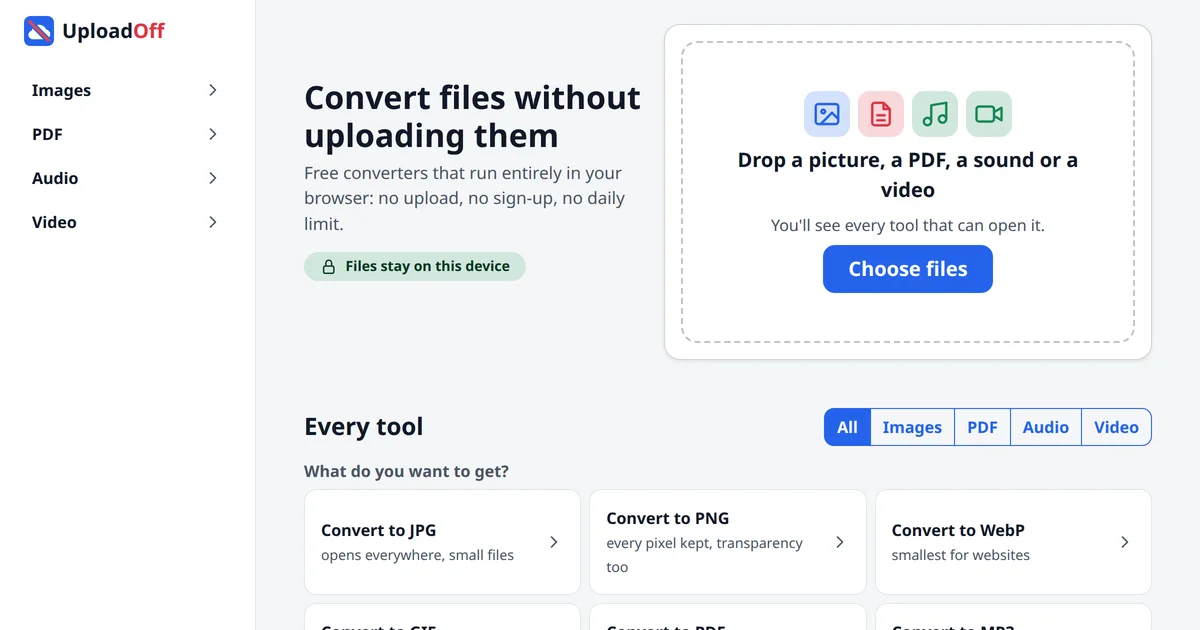
UploadOff is a free file converter that runs entirely inside your web browser. It handles images, PDFs, audio files, and videos, converting them on your own device so the files never travel to any server. There is no account to create, no daily limit, and after your first visit it keeps working without an internet connection.
Why UploadOff works
Most online converters send your files to a server you do not control, which means private photos, contracts, or recordings pass through a third party. UploadOff runs the conversion in your browser on your own computer or phone, so your files are converted and saved without leaving your device. Because there is no server in the middle, there is no upload queue to wait in and no cap on how many files you convert.
UploadOff features
- In-browser conversion with no upload. All conversion work runs inside the browser tab on your own computer or phone. Files are converted and saved without touching any server, and no file data leaves the page even during conversion.
- Images, PDFs, audio and video in one place. Four groups of converters cover images including HEIC photos from iPhones, PDF operations such as merging and splitting, audio conversion to MP3 or WAV from formats like FLAC and M4A, and video conversion to MP4 from MOV, MKV, and WebM. Drop a file and the site shows all the tools that can open it.
- Offline use after the first visit. The browser saves the converters to your device on the first visit. Turn off Wi-Fi and every converter still works. The HEIC decoder, text-to-PDF engine, and audio converter each download separately the first time you use them.
- Batch processing with ZIP download. Drop as many files as you like and save them one at a time or pack them all into a single ZIP archive. The only limit is the memory available on your device.
- Photo date and details kept in JPG output. When you save a converted image as JPG, you can choose to keep the date taken and camera details or remove them. HEIC photos converted to JPG carry the original date so they sort correctly in your gallery. PNG and WebP files always come out without metadata.
- Account-free unlimited access. There is no sign-up form, no paid tier, and no daily cap on conversions. Ads pay for the site and nothing is locked behind a paywall.
Who UploadOff is for
- iPhone owners who convert HEIC photos to JPG can keep the date taken and camera details so pictures sort correctly in their gallery, without sending personal photos to an outside server.
- People who handle sensitive documents such as legal contracts, medical records, or confidential reports can convert, merge, or split PDFs without the files touching any server.
- People with a slow or unreliable connection can use UploadOff with Wi-Fi off, because the converters save to the device on the first visit.
- Content creators who work with video and audio files can convert MOV, MKV, and other formats to MP4 or extract audio as MP3 without waiting in an upload queue or hitting a daily cap.
Similar micro SaaS ideas you can build
- In-Browser Product Photo Resizer. An e-commerce seller who lists on multiple marketplaces needs product images resized to different specifications for each platform without uploading product shots to a cloud service. A browser-based tool with named marketplace presets and batch processing, sold as a monthly subscription, would suit the ongoing nature of their workflow.
- Local Subtitle File Converter. A video editor or course creator needs to switch subtitle files between formats like SRT and VTT without sending draft scripts to an outside service. A focused in-browser converter sold as a one-time purchase fits this recurring need.
- Browser-Based Font Format Converter. A graphic designer or web developer needs to convert font files between TTF, OTF, and WOFF2 without sending proprietary typeface files to a third-party server. A subscription covering batch font conversions would appeal to agencies that manage multiple brand font libraries.