What is Tangerine?
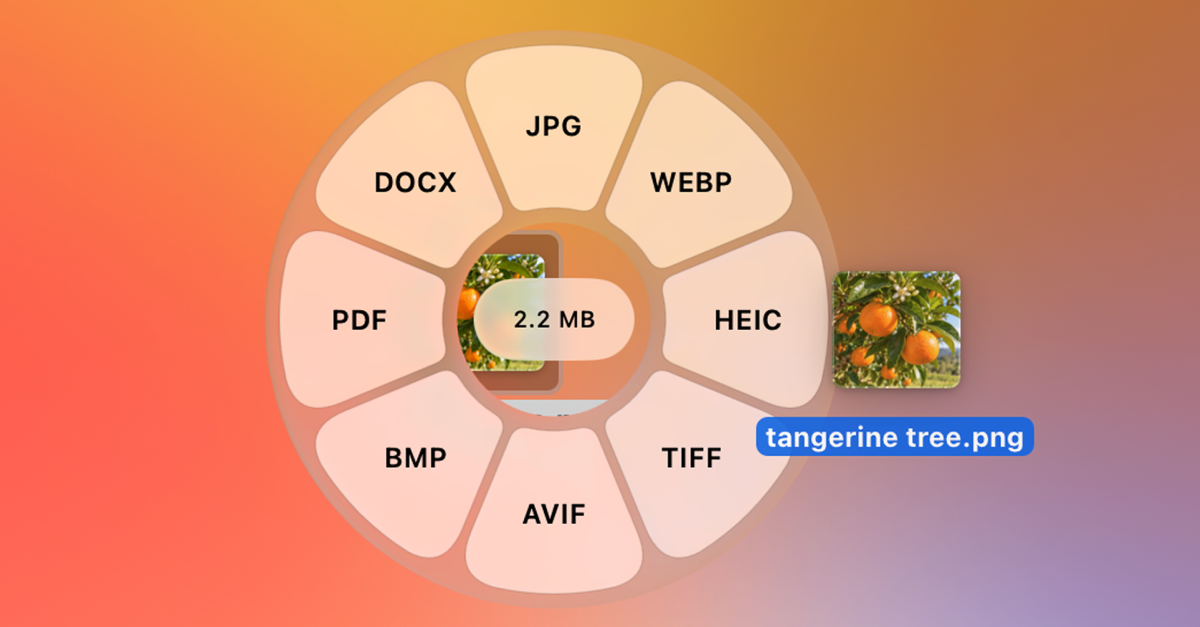
Tangerine is an offline Mac file converter for people who regularly transform files without wanting to open another utility. Drag a file and tap Shift for conversions, Command for file tools, or Control for actions, then choose from a wheel around the file. It includes 275 conversion paths, 26 file tools, and 6 file actions, and requires an Apple silicon Mac running macOS 13 or later.
Why Tangerine works
File conversion is often a context switch disguised as a tiny task: open a website or utility, import the file, choose settings, wait, then find the result. Tangerine puts relevant formats and tools around the file while you are already dragging it and keeps processing local, so the job happens at the pointer instead of inside another utility.
Tangerine features
- Convert while dragging. Drag a file and tap Shift to open conversion choices at the cursor. Tangerine has 275 conversion paths covering images, video, audio, documents, presentations, spreadsheets, subtitles, and archives.
- Use file specific tools. Tap Command during a drag to open editing tools relevant to the file. Tangerine includes 26 tools covering jobs such as compression, metadata editing, cropping, trimming, splitting, and merging.
- Keep processing local. Conversions, compression, and edits run on the Mac. Tangerine does not upload files, file contents, or file names, and the app contains no analytics, advertising, or tracking.
- Act on files and folders. Tap Control for AirDrop, Float, Copy, Move, Copy Path, or Terminal. File actions work with folders, mixed selections, and files that do not have conversion tools.
- Navigate without the drag gesture. Press Enter on a selected file to open the format menu. Command and Control switch between wheels, while the arrow keys, Enter, and Escape handle navigation and selection.
Who Tangerine is for
- Mac users who regularly convert images, video, audio, documents, spreadsheets, or archives and want to avoid opening a separate conversion utility.
- People handling private documents or media who want file conversions and edits to stay on their Mac rather than passing through an online converter.
- Mac users who repeatedly compress, crop, trim, split, merge, or change file metadata as part of everyday file preparation.
- Power users who frequently AirDrop, copy, move, inspect, or hand files off to Terminal and want those actions available during the same drag.
Similar micro SaaS ideas you can build
- Client delivery preflight. A desktop tool that checks a folder before handoff, then fixes formats, reduces oversized media, removes unwanted metadata, and creates a clean delivery package in one pass.
- Private document intake cleaner. A local utility that takes incoming documents and prepares them before filing by standardizing formats, combining or splitting files, and keeping sensitive material off remote servers.
- Publishing asset prep. A desktop tool that turns source images, audio, video, and subtitle files into the required delivery variants in one workflow, reducing the small conversion steps between export and publishing.