What is Ribbon?
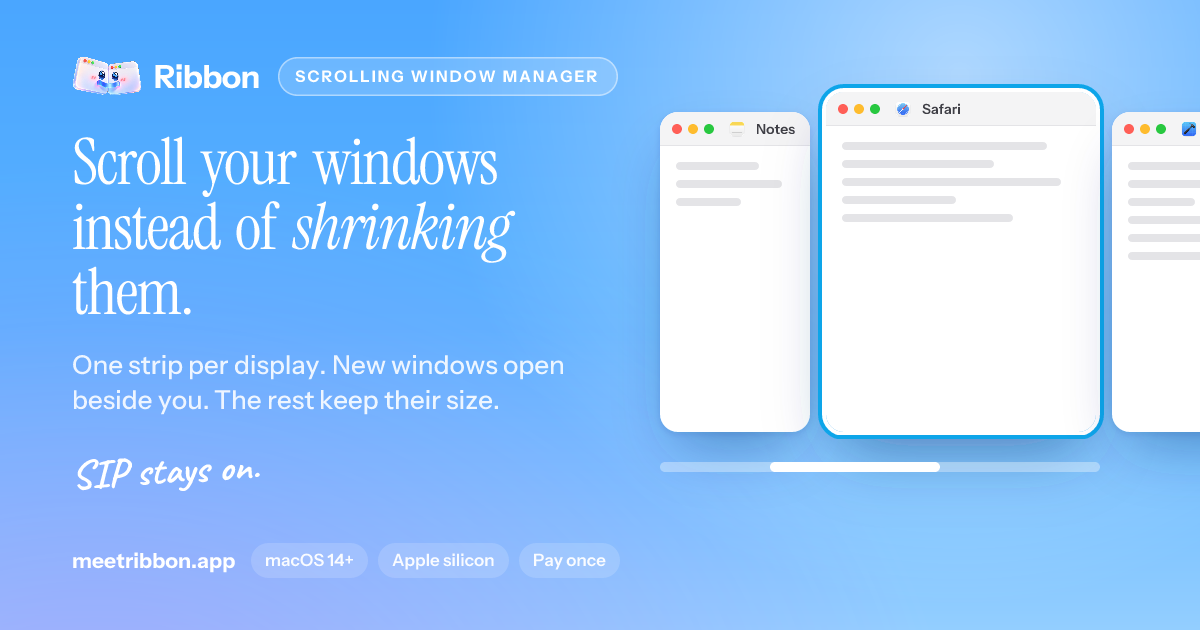
Ribbon is a scrolling window manager for Mac users who want more working space without squeezing every window into a grid. Apps sit on a horizontal strip, where each window keeps a chosen width while gestures or keyboard shortcuts move focus along the row. Each display gets its own strip, and Ribbon requires macOS 14 or later on Apple silicon.
Why Ribbon works
Traditional tiling makes every window compete for the same fixed screen, so adding another app can leave the ones already open too narrow to use comfortably. Ribbon lets the row extend beyond the display while preserving chosen window widths, so you move through full size workspaces instead of compressing everything until it fits.
Ribbon features
- Scrolling window strip. New windows open beside the focused column, and the row can continue beyond the edge of the display without shrinking the windows already there.
- Persistent window widths. Set a focused column to a quarter, third, half, two thirds, three quarters, or the full row. Opening another app does not reflow the rest.
- Stacks and tabs. Windows can share a column as a stack, and a stacked column can be turned into tabs when several apps need the same part of the strip.
- Keyboard and trackpad control. Default Control and Option shortcuts move focus, swap columns, change widths, stack windows, and toggle floating. Three finger swipes can move along the strip too.
- Independent display rows. Every display keeps its own strip. A shortcut can send the focused window to the next screen without reshuffling the display it leaves.
- Accessibility only setup. Ribbon uses macOS Accessibility to move and resize windows. It does not require a kernel extension or disabling System Integrity Protection.
Who Ribbon is for
- Mac users who keep several apps open at once and find fixed tiling layouts make individual windows too narrow.
- People using Stage Manager or traditional tiling who would rather move across a continuous row than hide or compress windows.
- Multi display Mac users who want each monitor to preserve its own window arrangement instead of reshuffling when a window moves between screens.
- Keyboard focused users who want configurable shortcuts for moving, resizing, stacking, and rearranging windows.
Similar micro SaaS ideas you can build
- Case file reader for litigators. A matter workspace that keeps depositions, exhibits, research, and notes at a comfortable reading size while lawyers move through them in a deliberate sequence. It preserves useful working space when the active set is larger than the screen.
- Incident workspace for small SaaS teams. A focused console that keeps logs, deploy details, error reports, and customer messages in separate readable views during an outage. Engineers move between the pieces of an incident without squeezing every source into one crowded dashboard.
- Visual reference workspace for designers. A research tool that keeps screenshots, references, and design drafts large enough to inspect while letting designers move through a much wider collection than the display can show at once. It replaces tiny thumbnail grids with readable working views.