What is Nameshot?
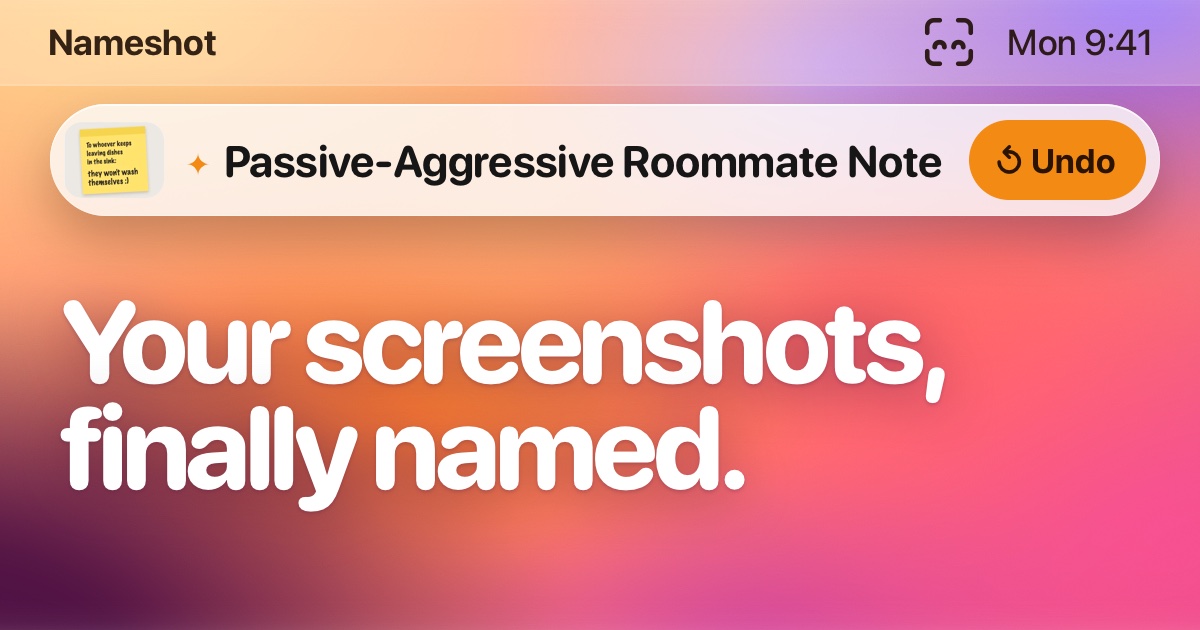
Nameshot is a Mac app for people whose screenshot folders fill up with filenames that say when an image was captured but not what it contains. It watches a chosen screenshot folder, uses Apple Intelligence and text recognition on the Mac to create human readable names, and can also rename images or entire folders dropped onto it. It requires Apple silicon and macOS 27, and the current beta is available through TestFlight.
Why Nameshot works
Default screenshot filenames tell you when a file was captured, not what is inside it, which makes a folder harder to scan once screenshots pile up. Nameshot reads each image locally and learns from names you correct, so files become recognizable at a glance instead of staying buried behind timestamps.
Nameshot features
- Automatic screenshot naming. New screenshots can be renamed as they are taken, using Apple Intelligence or text detected inside the image to produce a useful filename.
- Whole folder cleanup. Tidy Up can rename an existing folder in one pass, including screenshots that were already there before Nameshot started watching.
- Learns your naming style. When you correct a generated name, Nameshot remembers the change locally and uses recent corrections to make future names sound more like yours.
- Every rename can be undone. Nameshot stores the original filename on the file, so a recent rename or an entire remembered batch can be restored.
- Local processing. Screenshots and their contents stay on the Mac. Nameshot has no account, analytics, advertising, or network connection of its own.
Who Nameshot is for
- Mac users who take enough screenshots that timestamp filenames no longer help them recognize what each file contains.
- People with a cluttered Desktop or screenshots folder who want existing images renamed in one pass.
- Users handling private screenshots who want image analysis and naming to happen locally rather than uploading files to an online service.
- People with a personal file naming style who want automatic names to adapt when they make corrections.
Similar micro SaaS ideas you can build
- Receipt organizer for freelancers. A local utility that reads incoming receipts and invoices, then renames each file with useful details such as merchant, date, and document type. It learns from corrections so recurring vendors gradually follow the user's preferred naming pattern.
- Product photo intake for online sellers. A desktop tool that turns camera filenames into recognizable product names before photos enter a store workflow. Sellers could drop in a batch, correct a few names, and have future imports follow the same naming conventions.
- Research capture librarian. A Mac utility for researchers who save screenshots, charts, and reference images faster than they can organize them. It reads each capture, gives it a descriptive filename, and learns how the user labels topics so later material is easier to find.