What is Typeface?
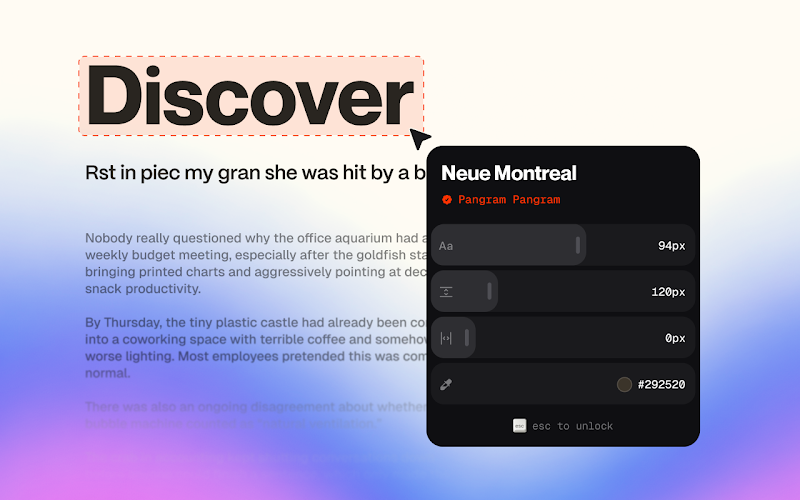
Typeface is a Chrome extension for people inspecting typography on live webpages. Hover over text to see the typeface and foundry behind it, then adjust text size, line height, letter spacing, or color directly on the page. Changes are temporary and reset when the extension closes.
Why Typeface works
Copying text into another tool just to inspect its typography adds a detour between seeing a type choice and understanding it. Typeface puts the typeface and foundry under the cursor and keeps visual experiments on the live page, so you inspect and test the real context instead of guessing elsewhere.
Typeface features
- Identify fonts on hover. Move over text on a webpage to see the typeface and foundry behind it without leaving the page.
- Test text size in place. Adjust text size directly on the live page to see how the typography changes in context.
- Tune spacing and color. Experiment with line height, letter spacing, and text color while viewing the original webpage.
- Keep edits temporary. Typography changes reset once you close the extension, so experiments do not persist.
- No developer data collection. The developer discloses that the extension does not collect or use user data.
Who Typeface is for
- Web designers inspecting a live page who want to identify the typeface and foundry without leaving the browser.
- Frontend developers testing text size, line height, letter spacing, or color directly in the page they are viewing.
- Design students studying how real webpages use typography and wanting to inspect font choices in context.
Similar micro SaaS ideas you can build
- Live spacing inspector for web layouts. A browser tool for frontend teams that reveals spacing around page elements and lets them test temporary margin and padding changes in place.
- Color sampler with temporary page swaps. A browser utility for designers that identifies colors on a live page and lets them try replacements without changing the site's saved styles.
- Icon source inspector for design teams. A tool that identifies SVGs and icon libraries used on a webpage, then lets designers preview replacement icons in the same interface before updating the source.