What is Atlas?
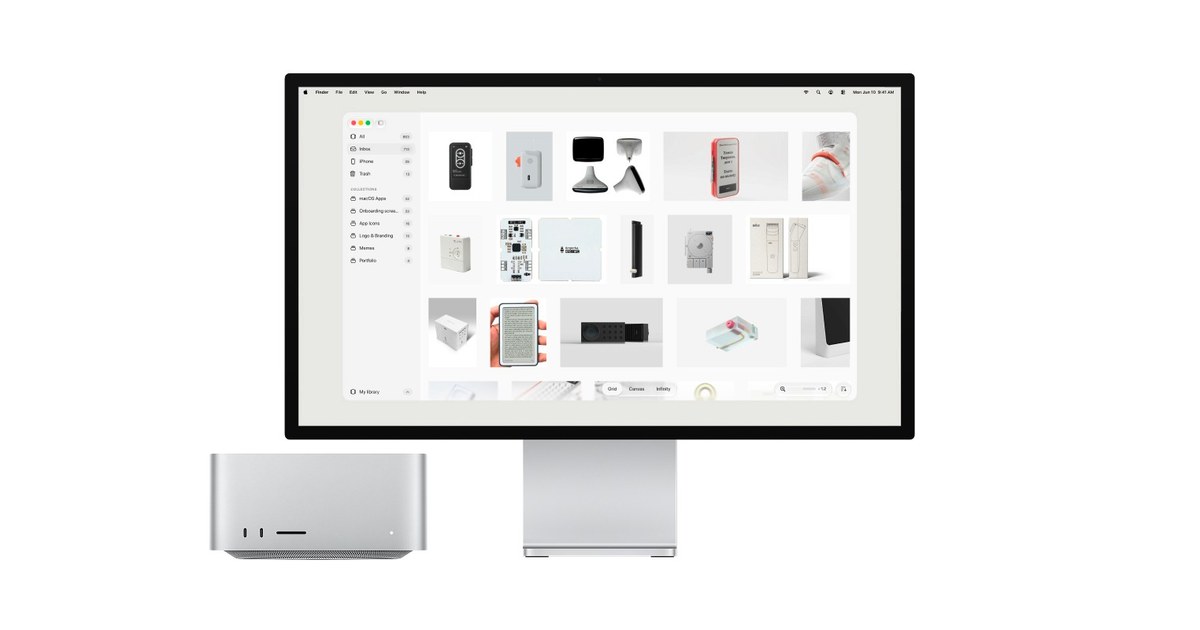
Atlas is a native Mac visual library for designers, artists, and creators who collect references they want to revisit. It organizes images, videos, and links into collections, with Grid for browsing, Canvas for arranging, and Infinity for open ended exploration. Files can stay in existing folders on a Mac, external drive, Dropbox, iCloud, or another synced location.
Why Atlas works
Visual reference apps become a chore when using one means rebuilding a folder system or handing over the files themselves. Atlas reads existing folders where they already sit and adds fast visual browsing, collections, and flexible views around them, so creators organize the files they already own instead of importing everything into a separate library.
Atlas features
- Keep files where they are. Atlas can connect to existing folders without moving their contents. Libraries can live on an internal disk, external drive, Dropbox, iCloud, or another folder synced to the Mac.
- Three ways to browse. Grid lets users scan large libraries, Canvas gives them space to arrange related references, and Infinity provides an edge free view for exploring visually.
- Capture from the browser. Safari and Chrome extensions send images, videos, and links directly into Atlas while browsing. Saved items go into the Atlas library without a separate download and import step.
- Drop files from the menu bar. Anything dropped onto the Atlas menu bar icon lands in the Inbox, giving users a quick place to collect material before sorting it.
- Connect an Eagle library. Existing Eagle libraries can be connected directly, so users can keep their current collections and tags without rebuilding the library from scratch.
Who Atlas is for
- Designers who keep large folders of visual references and want to browse and arrange them without moving the original files.
- Artists who collect images, videos, and links as inspiration and want different views for scanning or exploring the same library.
- Creators who save references while browsing and want Safari or Chrome captures to land directly in an organized Mac library.
- Mac users with an existing Eagle library who want to carry their collections and tags into a native Mac app without starting again.
Similar micro SaaS ideas you can build
- Shot finder for video production. A desktop library for editors and small production teams that indexes existing footage folders visually, so they can scan for the right shot without moving media out of the project archive.
- Material board for interior projects. A workspace for interior designers to collect product pages, finish photos, and room references, then arrange shortlisted options visually while keeping the original files and links organized by project.
- Visual memory for brand teams. A searchable reference archive for small brand teams that keeps past campaigns, packaging, photography, and competitor references in shared synced folders, so new work starts from what the team has already collected instead of another round of hunting.