What is SideGlass?
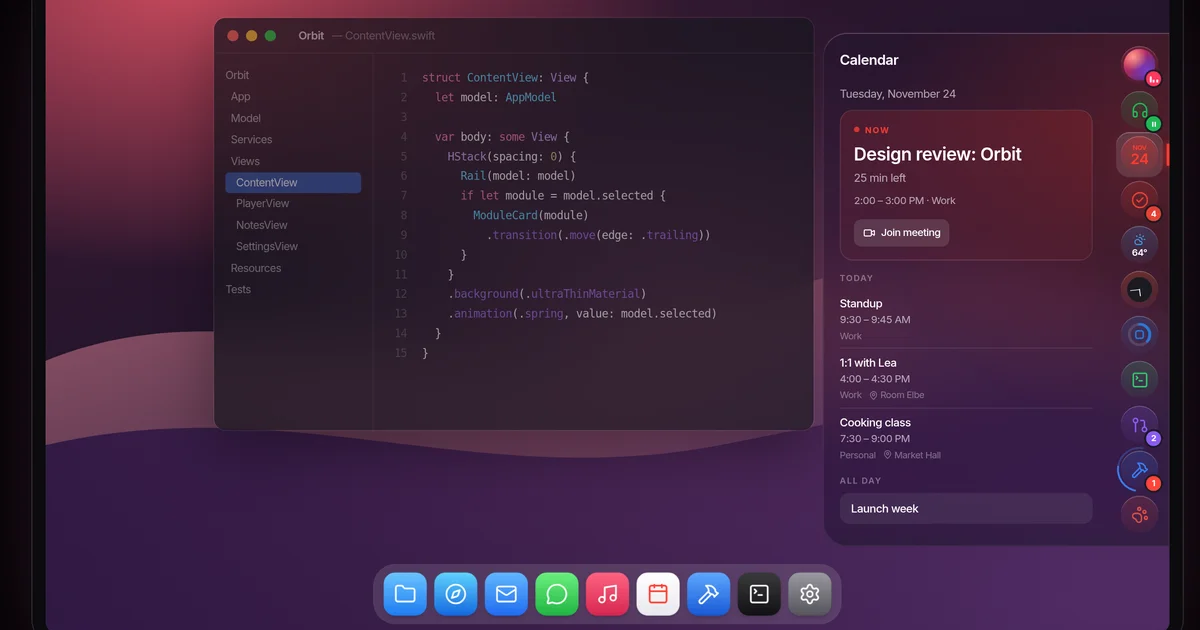
SideGlass is a macOS app that places a slim rail at the left, right, top, or bottom edge of the screen. Moving the mouse to the edge opens a card with whichever of its 32 modules is active, covering calendar, reminders, music, tasks, clipboard, and developer tools such as Terminal, GitHub, and Xcode Cloud. Hovering opens the card, a click pins it open while work continues, and clicking again or pressing Escape collapses it back to a slim strip without changing the foreground app.
Why SideGlass works
Reaching for calendar details, music controls, or a GitHub review means switching apps, which pulls attention away from the task already on screen. SideGlass puts those checks at the screen edge: a single mouse move shows the information while focus stays on the original window, because the card never brings a window forward or steals focus. Each module reads data that already lives on the Mac or in connected services, so the interruption is a hover rather than an app switch.
SideGlass features
- Screen edge card that preserves focus. Moving the mouse to the rail opens a module card without bringing a window forward or stealing focus. The card stays alongside active work, closes on another click or Escape, and pins open when interaction is needed.
- 32 modules with drag-and-drop ordering. Every module can be turned on or off and dragged into any order, with hidden modules waiting in their own group. Each module has its own settings, so the rail shows exactly what is in use and nothing else.
- Developer tools in the Pro tier. Pro adds a real login shell with up to eight tabs that shows whether Claude Code or Codex is working or waiting, a Localhost view for every running dev server, GitHub pull request and CI status, and Xcode Cloud build monitoring, all without opening a browser tab or switching away from the current window.
- Data stays on your Mac. Calendar, reminders, contacts, notes, music, clipboard history, and Bear content are read locally with no account required and no cloud relay. Access for Todoist, GitHub, Bear, and Xcode Cloud lives in the macOS keychain, and clipboard history never leaves the Mac and excludes passwords and password manager content.
- 14-day trial with every module open. The trial runs for 14 days with every module available and requires no account or payment details. After the trial, three plans cover different module sets on a monthly or yearly basis: Basic at $1.99 per month covers everyday modules, Plus at $4.99 per month adds productivity and assistant tools, and Pro at $8.99 per month adds the developer tier.
- Adjustable position, glass style, and size. The rail sits at the left, right, top, or bottom edge, can float with space around it, or auto-hide when not in use. Rail and card sizes are set separately across four sizes, and the glass style runs from clear to solid with an ambient glow in each module's colour.
Who SideGlass is for
- Developers on macOS who want their GitHub pull requests, CI status, Terminal tabs running Claude Code or Codex, and local dev server state visible at the screen edge while they code.
- Mac users who check calendar events, Reminders, Todoist tasks, or Things to-dos repeatedly through the day and want those checks to cost a mouse move rather than an app switch.
- Productivity app users who keep Bear notes, RSS feeds, clipboard history, and Pomodoro sessions open in a secondary context alongside their main work.
- Mac users who want all their daily tools close at hand but are unwilling to share app data with an external account or cloud service.
Similar micro SaaS ideas you can build
- Screen edge productivity rail for Linux desktops. A panel daemon for GNOME or KDE that surfaces calendar events, running terminal sessions, and system stats in a hover card when the cursor reaches the screen edge. Sold as a subscription to developers and power users who want the same muscle memory across operating systems.
- Clipboard manager with context-aware pinning. A macOS utility that automatically pins clipboard items based on the active app, so code snippets pin while a terminal is focused and meeting notes pin while a document is open. Sold as a standalone tool at a one-time price targeting writers and developers who live in multiple apps.
- CI and deploy status sidebar for small development teams. A lightweight desktop app that surfaces build status, open pull requests, and failing tests for the active repository in a persistent edge panel, with integrations for GitHub, GitLab, and Bitbucket. Sold per seat to small teams who want build awareness without keeping a browser tab open all day.