What is Kite Delivery Date picker?
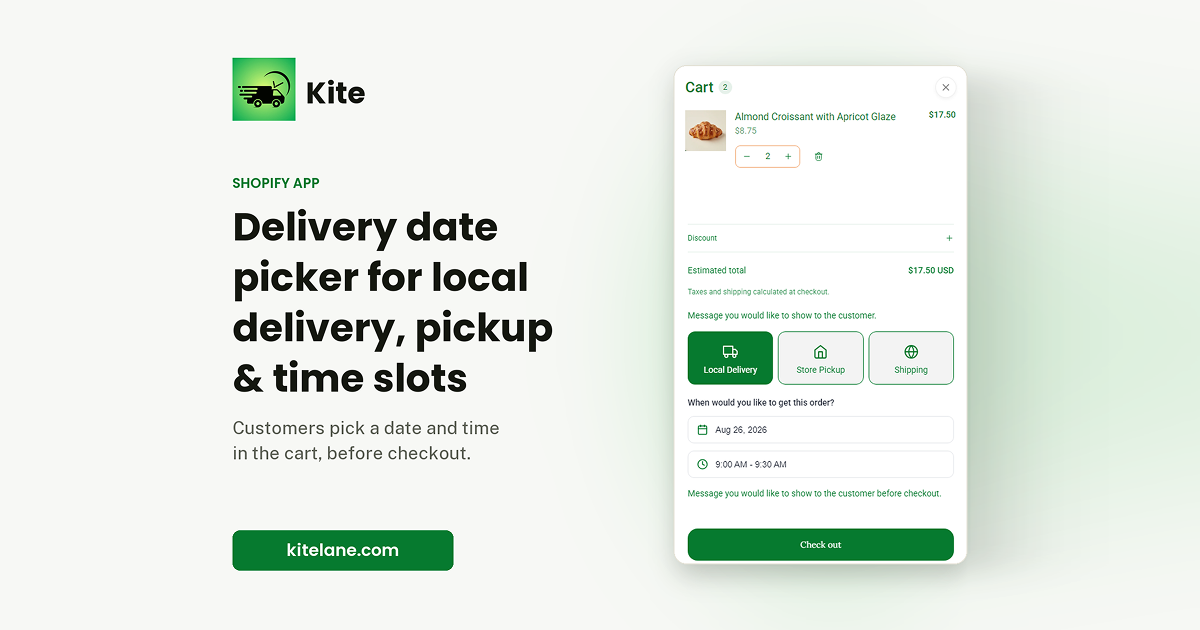
Kite is a Shopify delivery and pickup date picker for stores where fulfillment timing matters. Customers choose local delivery, store pickup, or shipping dates and time slots from the cart, while merchants set prep time, cutoff time, blackout dates, and schedules by day and location. The selected date is saved on the Shopify order, and the app installs through a theme app block without changing theme code.
Why Kite Delivery Date picker works
A customer choosing an unavailable date creates a fulfillment problem after the order has already been placed. Kite applies the store's real prep times, cutoffs, blackout dates, and slot limits before the customer confirms a date, so the storefront offers workable fulfillment windows instead of leaving staff to reschedule impossible orders.
Kite Delivery Date picker features
- Capacity aware time slots. Set order limits per time slot so customers can only choose capacity the store can actually handle. Order limits are available on the Advanced plan.
- Prep times and daily cutoffs. Orders placed after a daily cutoff automatically move to the next available slot, which removes manual rescheduling for dates the store can no longer meet.
- Blackout dates and holidays. Block single dates, date ranges, or individual time slots during holidays and busy periods.
- Location and postcode rules. Paid plans can set schedules across multiple locations and validate delivery eligibility using exact, partial, or custom postcode patterns.
- Shopify theme installation. Enable the Kite app block on the cart page through the Shopify theme editor. No developer or theme rebuild is required for the standard setup.
Who Kite Delivery Date picker is for
- Bakeries taking custom cake orders that need enough lead time before the requested pickup or delivery date.
- Florists handling date critical gifts where a late delivery changes the value of the order.
- Meal prep and catering stores that need customers to choose from fulfillment windows that match multi day preparation.
- Grocery and fresh food stores coordinating delivery schedules across locations or fixed delivery routes.
Similar micro SaaS ideas you can build
- Mobile service booking by territory. A booking tool for mobile repair and installation teams where customers enter their postcode and see only appointment windows that fit the service area, travel schedule, and remaining daily capacity.
- Production promise dates for custom orders. A tool for small made to order brands that turns preparation time, closed days, and current workload into realistic completion dates before a customer commits to an order.
- Loading slot scheduler for small wholesalers. A reservation system for warehouses and wholesalers that lets trade customers book collection windows while capping each slot, blocking closure dates, and preventing too many pickups from arriving at once.