What is Label Wizard?
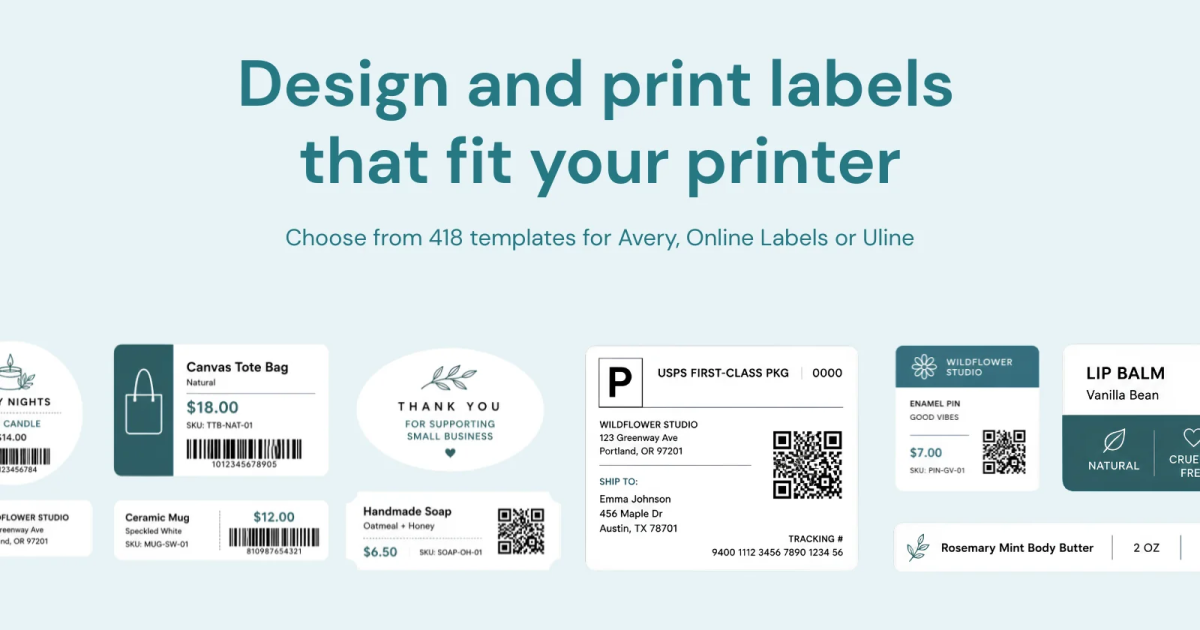
Label Wizard is a Shopify label printing app for merchants who need product and variant labels without exporting store data. It pulls images, titles, prices, SKUs, variants, and barcodes straight from Shopify, then lets users design and preview labels before printing. It supports Avery, Online Labels, custom sizes, sheet stock, continuous feed, and thermal printing.
Why Label Wizard works
Product label work gets messy when Shopify data is exported to a spreadsheet, retyped into another tool, then nudged until the sheet lines up. Label Wizard keeps the store data, layout, paper setup, and print preview in one Shopify workflow, so merchants print from live product data instead of rebuilding labels by hand.
Label Wizard features
- Live Shopify product data. Pull images, titles, prices, SKUs, variants, and existing barcodes straight from the store, so label content does not need to be exported or typed again.
- Drag and drop label layouts. Place product images, custom text, prices, barcodes, and QR codes where you want them, then save the layout as a reusable template.
- Flexible paper and printer setup. Print on Avery, Online Labels, custom sheet sizes, continuous feed, or thermal stock using laser, inkjet, direct thermal, thermal transfer, and continuous feed printers.
- Exact sheet preview. See the sheet update as paper size and layout settings change, then preview the exact output before printing a label.
- Variant labels in one batch. Generate a separate label for every product variant, including size and color variants, with the matching barcode on each label.
Who Label Wizard is for
- Shopify merchants who currently export product data to spreadsheets before building labels in a separate tool.
- Stores with size, color, or other product variants that need the correct barcode on every variant label.
- Merchants printing on Avery or Online Labels sheets who want to preview alignment before using label stock.
- Shops using laser, inkjet, thermal, or continuous feed printers that want to keep their existing paper and hardware.
Similar micro SaaS ideas you can build
- Replacement tag station for returned goods. A tool for resale and warehouse teams that pulls the canonical item record when a return arrives, then prints a fresh barcode and product tag so damaged or missing labels do not turn into manual data entry.
- Sample ID printing for small labs. A narrow app that turns accession records into tube, tray, and specimen labels with barcodes or QR codes, so staff print identifiers from the source record instead of copying IDs at the bench.
- Attendee badge batcher for small events. A badge tool that converts registration records into print ready name badges with roles and QR codes, with reusable layouts and an exact sheet preview before expensive badge stock goes through the printer.