What is Dayflow?
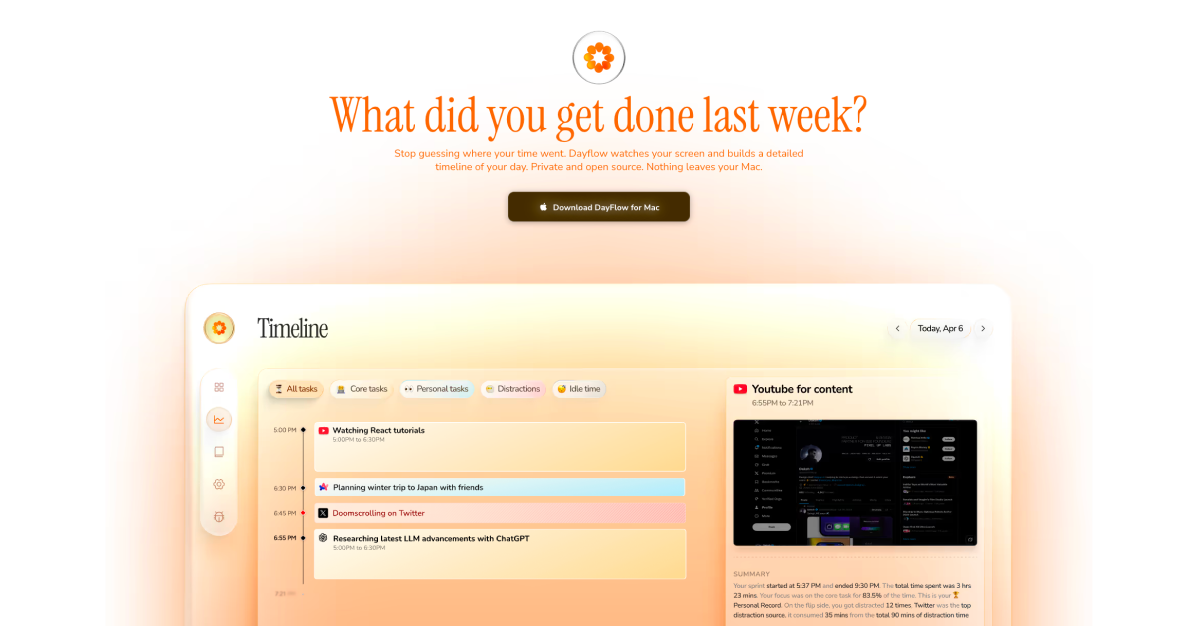
Dayflow is a native macOS work journal for developers, freelancers, and knowledge workers who want an honest record of what happened on the screen. It records screen activity, analyzes it with the AI provider the user chooses, and turns the day into timeline cards, summaries, focus patterns, and answers to questions about recent work. It records at 1 frame per second and analyzes activity every 15 minutes.
Why Dayflow works
App names are a weak proxy for work, because two hours in Cursor or YouTube can mean focused progress, research, debugging, or drift. Dayflow watches screen context and turns it into timeline summaries, weekly patterns, and searchable answers, so the user reconstructs the day from observed work instead of starting timers and cleaning up vague app logs.
Dayflow features
- Automatic timeline. Dayflow turns screen activity into chronological cards so users can reconstruct what they did without starting timers or writing notes.
- Context aware summaries. It looks at what was on screen, not only which app was active, so Cursor, Chrome, Slack, and YouTube become work context instead of a raw usage list.
- Chat with the work journal. Users can ask questions about a day, week, or year and get answers grounded in their timeline rather than digging through screenshots or memory.
- Local and chosen AI modes. Users can run local models through Ollama or LM Studio, use Gemini with their own API key, or use ChatGPT and Claude through local CLI tools.
- Weekly review. Dayflow aggregates focus patterns, categories, app usage, and interaction graphs so users can see where the week went and what pulled them off track.
- Free personal plan. Personal use is free, open source, and has no account required. The plan includes automatic activity timelines, AI summaries, and bring your own API keys.
Who Dayflow is for
- Developers who need a standup update from actual screen history instead of trying to remember what they shipped, debugged, or blocked.
- Freelancers who want client notes and personal reviews from a captured timeline without running a manual timer for every task.
- Knowledge workers trying to see which parts of the day were deep work, shallow tasks, breaks, or drift into Slack and YouTube.
- Privacy conscious Mac users who want screen history stored locally and AI analysis they can keep on device.
Similar micro SaaS ideas you can build
- Support shift recap builder. A handoff tool for support leads that turns closed tickets, escalations, and chat notes into a clear shift recap, so the next lead sees what happened without reading every thread.
- Construction progress journal. A site diary for small contractors that turns timestamped crew photos and daily notes into a project timeline for owners, change orders, and end of week reviews.
- Incident postmortem recap builder. A documentation tool for engineering managers that turns PagerDuty alerts, Datadog signals, and Slack incident threads into a structured postmortem timeline, so blameless reviews do not depend on someone's memory of a 3 am page.