What is Plimo?
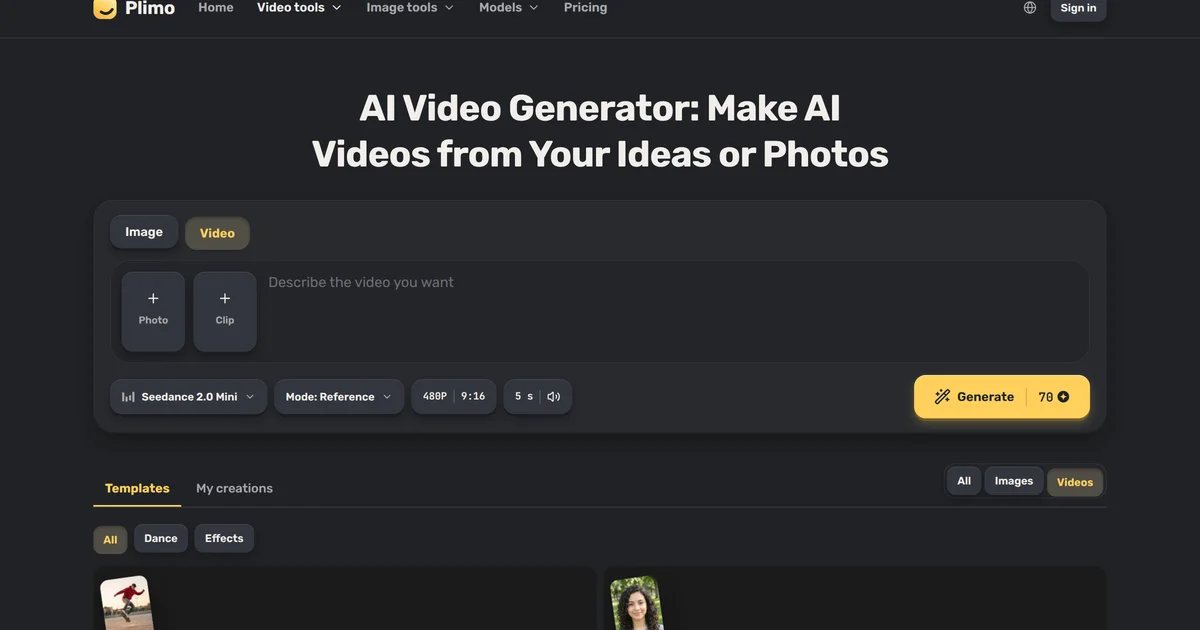
Plimo is a browser-based AI video and image generator that brings 15 of the newest video models, including Veo 3.1 Fast, Kling 4.0, and Seedance 2.5, into one account. Short-video creators, online sellers, and families use it to turn a text prompt, a still photo, or a filmed clip into a finished video with sound, at resolutions up to 4K and lengths up to 30 seconds. The same account also covers image generation, photo editing, GIF creation, and AI headshots, with images and videos sharing the same credit balance.
Why Plimo works
Each new AI video model tends to launch on its own site with its own account and subscription plan. Plimo routes requests through a single account to whichever model the user picks, so a creator can run the same idea on two models, compare the results, and keep the better one without managing separate logins or separate plans.
Plimo features
- Fifteen video models in one account. Run Veo 3.1 Fast (Google, 4K, always 8 seconds), Kling 4.0 (up to 30 seconds, edits a filmed clip), Seedance 2.5 (ByteDance, up to 30 seconds), MiniMax H3 Max (up to 15 seconds, made for faces), Wan 3.0 (Alibaba, 2 to 30 seconds), Grok Imagine 1.5 (quick drafts, often done in about 45 seconds, up to 15 seconds), and more, all from one account, with new models added soon after they launch.
- Three ways to start a video. Write a sentence to generate a new scene, upload a photo to use it as the first frame with the face preserved, or upload a clip so Kling 4.0 can restyle it or borrow its movement for a new scene.
- Sound in the same generation pass. Veo 3.1 Fast, Kling 4.0, MiniMax H3 Max, and Grok Imagine 1.5 add sound to every clip they produce, so a video with audio comes back in one step without a separate audio tool.
- Reference image for consistent subjects. Upload a reference photo of a character, mascot, or product to keep that subject looking the same across every generated clip, useful for branded video series or repeated social posts.
- Trending effect templates. Pre-built templates come with the prompt and settings already worked out, so uploading a photo is enough to produce a trending effect without writing a prompt from scratch.
- Image tools in the same account. The same credit balance covers an AI image generator, image-to-image editing, a GIF generator, a photo editor, an AI headshot generator, and appearance tools including AI clothes changer and hairstyle changer. Any generated image can be used as the first frame of a video.
Who Plimo is for
- Short-video creators posting to TikTok, Reels, and Shorts who need vertical video with sound generated from a prompt or photo, without organizing a shoot or editing audio separately.
- Online sellers who want listing shots from a phone photo, such as a product placed on a marble stand in soft studio light, plus short clips of the same product for social posts.
- Families and individuals who want to turn an old or still photo into a short animated video clip through the image-to-video feature.
- Job seekers who need a professional headshot from a casual photo and want to generate one through the AI headshot generator without booking a photographer.
- Brand teams and creators who need a consistent character or mascot across multiple clips, using the reference image feature to keep the subject looking the same in every video.
Similar micro SaaS ideas you can build
- AI product video studio for ecommerce sellers. Shopify and marketplace sellers who upload a product photo and get a 15-second clip with sound ready for TikTok or Reels ads, paying monthly to replace per-shoot studio costs.
- Branded short-video generator for social agencies. Social media agencies managing multiple brand accounts that upload a brand character reference image and generate consistent short videos for each client across TikTok and Reels from one dashboard, paying per seat or brand.
- Batch headshot tool for HR teams. Recruiting firms and HR departments that upload employee or candidate photos and get professional AI headshots back in one pass, paying per seat to replace per-person photography bookings.
- Short video ad maker for local businesses. Restaurants, gyms, and salons that upload a food or product photo and generate a 15-second vertical video ad with sound for local social campaigns, paying monthly to avoid hiring a video editor.