What is FlowRunner?
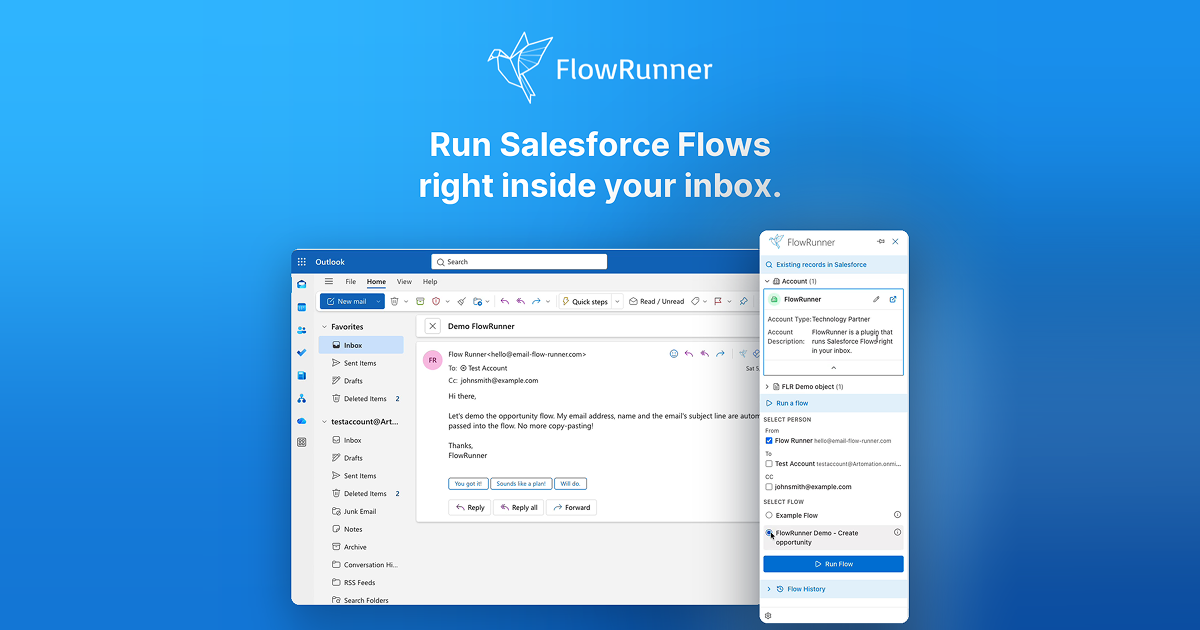
FlowRunner is an inbox tool for Salesforce teams whose reps work from Outlook or Gmail but need the CRM kept current. Admins build record lookup logic and Screen Flows in Salesforce, then FlowRunner shows matched records in the email sidebar and runs the assigned Flow with sender, recipients, subject, body, thread, and user context already filled in. It ships as a Salesforce managed package plus an Outlook add in or Gmail Chrome extension, with a 14 day trial and pricing at €12 per user per month plus €50 per org per month.
Why FlowRunner works
Salesforce adoption breaks when the real work happens in email and the required fields live in another tab. FlowRunner moves the admin's own Flow logic into the message view and fills it with email context, so logging a call, creating a case, or qualifying a lead happens while the thread is open. The CRM gets updated from the inbox instead of being reconstructed from memory on Friday.
FlowRunner features
- Inbox Screen Flows. Users open an email, choose an assigned Screen Flow, and run it in the Outlook or Gmail sidebar with Salesforce executing the Flow under the user's session.
- Custom record lookup. Admins override the RecordLookup Flow to decide which Contacts, Accounts, Opportunities, Cases, or custom objects appear when a message opens.
- Email context inputs. Declared FLR variables can receive sender, recipients, subject, body, thread ID, message ID, and the Microsoft or Google user identity.
- Admin controlled teams. The admin panel lets teams see different Flows, so sales can get opportunity actions while support gets case actions from the same install.
- Salesforce owned data. Flows run inside Salesforce with Permission Sets, validation rules, Apex, and triggers still applying. Customer record data is not persisted by FlowRunner.
- One visible plan. Every feature is included at €12 per user per month plus €50 per org per month, with a one user 14 day trial that needs no credit card.
Who FlowRunner is for
- Salesforce admins and RevOps teams whose Screen Flows pass QA but stay unused because reps avoid opening another CRM tab.
- Sales leaders who need pipeline reviews to start with current deal data instead of activity backfilled during the meeting.
- Sales reps living in Outlook or Gmail who need to log calls, create opportunities, or qualify leads from the message that prompted the work.
- Support or success teams using Salesforce Cases, renewals, or custom objects and wanting each email thread to surface the right record.
Similar micro SaaS ideas you can build
- Vendor approval runner for finance teams. An inbox tool that matches a supplier email to the right invoice or purchase order and opens the approval checklist, so exceptions are resolved before the message gets forwarded around finance.
- IT/HR ticket runner for ServiceNow inboxes. A Gmail and Outlook sidebar for support agents that matches an incoming ticket email to the right ServiceNow record and opens the guided resolution flow, so triage and updates happen while the email is still open.
- Contract renewal runner for legal ops teams. An inbox tool for legal ops that matches a renewal or redline email to the right contract record and opens the approval flow, so terms get reviewed before the thread gets forwarded around instead of logged later.