What is Gigpie?
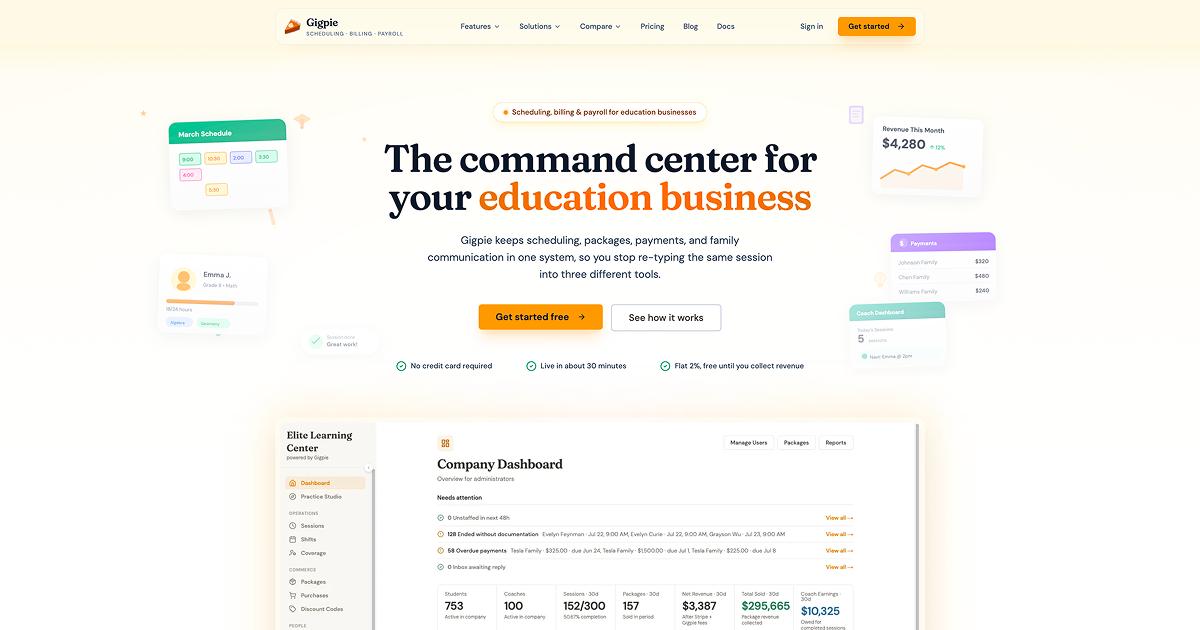
Gigpie is education business management software for tutoring centers, coaching agencies, music schools, test prep companies, and enrichment programs. It keeps family records, scheduling, package billing, payments, progress notes, educator pay, and reporting in one workspace. It is built for teams of three or more educators, with unlimited educator accounts, students, and families.
Why Gigpie works
Tutoring businesses often retype the same session into calendars, payment tools, and spreadsheets, which turns routine admin into reconciliation work. Gigpie connects family balances, bookings, payments, notes, and educator earnings to the same session record, so one completed session updates the business instead of leaving an admin to rebuild the trail by hand.
Gigpie features
- Family centered records. Keep parents, siblings, student goals, learning preferences, package balances, and payment history together. Packages can belong to the family so siblings draw hours from one shared balance.
- Scheduling tied to real calendars. Educators manage their availability while parents book within the rules you set. Google Calendar and Microsoft Outlook busy times can block slots before a new session is booked.
- Package billing and collections. Sell fixed hour packages, installment plans, or subscriptions, then collect through Stripe. Gigpie charges 2% of payments collected through the platform, while manually recorded cash and check payments carry no Gigpie fee.
- Session based educator payroll. Completed sessions already contain the educator and rate, so earnings accrue as work is delivered. Payroll ends in a CSV export for your payroll processor instead of a spreadsheet rebuilt each cycle.
- Reports from operating data. Executive and capacity reports build from sessions already running in Gigpie. They reconcile cash against what families still owe and help forecast when the business may need to hire.
Who Gigpie is for
- Owners of tutoring centers with several educators who need family scheduling, package balances, billing, and progress records in the same system.
- Coaching agencies coordinating multiple educators that want earnings calculated from sessions actually delivered.
- Music schools scheduling lessons across instruments while keeping parents, siblings, billing, and lesson activity connected.
- Test prep companies selling session packages while tracking scores, intensive schedules, and educator activity.
- Enrichment programs running group classes or multi session programs that need family enrollment, attendance, scheduling, and billing.
Similar micro SaaS ideas you can build
- Shared credit wallet for household services. A lightweight billing layer for service businesses where several family members draw from one prepaid pool. It tracks purchases, usage, and remaining credits at the household level instead of forcing every person into a separate balance.
- Delivered work reconciler for contractor teams. A tool that matches scheduled work with what actually happened, then flags completed jobs that still need billing or contractor payout. It gives an owner one exception queue instead of reconciling calendars, payment records, and payout sheets by hand.
- Client commitment tracker for recurring service packages. A small app for businesses selling a fixed number of sessions or visits that shows which customers are using what they bought, which packages are going dormant, and which commitments are nearly exhausted. The operator manages fulfillment from actual consumption instead of treating a sale and its later delivery as separate records.