What is Eva Split?
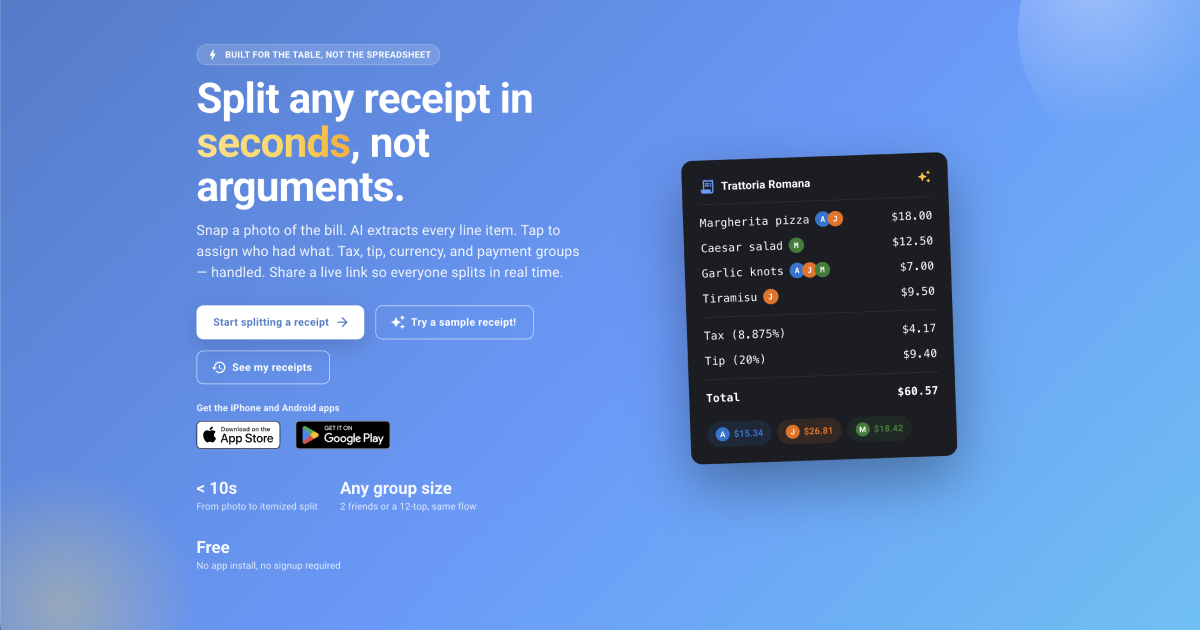
Eva Split is a web bill splitter for friends sharing restaurant meals. Snap or upload a receipt and its AI extracts the line items, then each item can be assigned to one person or split across several people. It handles tax, tip, payment groups, and currency conversion, with no account required to start and five free AI receipt scans a month after signing in.
Why Eva Split works
Restaurant bills get awkward when shared dishes, tax, tip, and couples paying together turn a simple split into mental arithmetic. Eva Split assigns each line to the people who had it and distributes tax and tip proportionally, so each person sees what they owe instead of forcing one diner to rebuild the receipt in a spreadsheet.
Eva Split features
- AI receipt scanning. Snap or upload a receipt and Eva Split extracts individual items, subtotal, tax, and tip so the bill does not need to be typed out by hand.
- Tap to assign items. Add everyone at the table and assign each line to the people who ordered it. Shared items are divided evenly across the selected people.
- Proportional tax and tip. Enter tax and tip as an amount or percentage and Eva Split distributes them according to each person's share of the bill.
- Payment groups. Combine couples or families into one payment group so their individual items roll into a single final total.
- Currency conversion. Convert a receipt from the local currency to a home currency using a live exchange rate when eating abroad.
- Live group splitting. After signing in, share a link so everyone can open the same receipt on their phone and assign their own items in real time.
Who Eva Split is for
- Friends splitting restaurant bills where people ordered different dishes or shared appetizers.
- Couples and families dining with a larger group who want their individual items combined into one payment total.
- Travelers eating abroad who need to split a local currency receipt and see amounts in their home currency.
- Frequent diners who want to scan receipts instead of entering every line item manually.
Similar micro SaaS ideas you can build
- Team order reimbursement reconciler. A tool for offices where one person places a large lunch or supply order, then assigns individual items and shared delivery, fees, and tax across employees before submitting reimbursements.
- Group booking cost allocator. An app for trips where one reservation covers different combinations of travelers, such as rooms, excursions, and transfers. It tracks who joined each part and divides shared charges only among the people involved.
- Wholesale order allocator for small buying groups. A tool for clubs, studios, and small communities that place one bulk supplier order. Members claim their items while shipping, discounts, and taxes are distributed across the relevant purchases, turning one invoice into clear individual balances.