What is Directify?
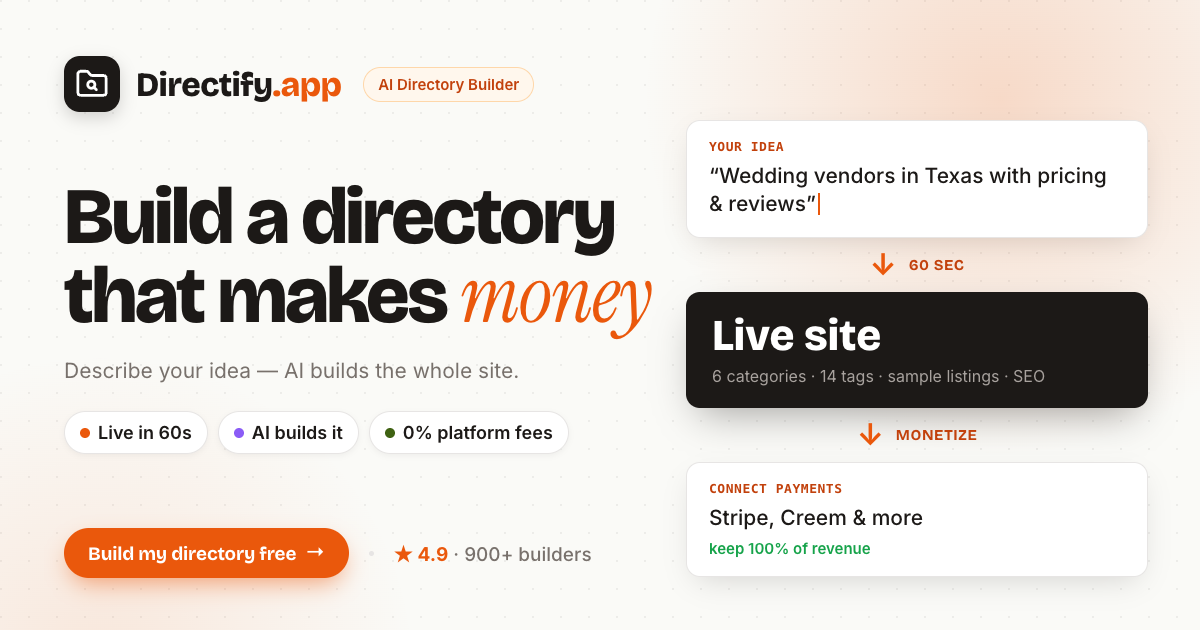
Directify is a no code directory website builder for creators and marketers who want to launch a niche directory without building the site from scratch. Describe the idea in one sentence and its AI assembles a template, categories, custom fields, sample listings, and SEO in about a minute. Real listings can then come in through CSV, Google Sheets, a Chrome extension, Google Maps import, or the REST API.
Why Directify works
A directory can stall before launch when its structure, listings, design, SEO, and payment setup all need separate work. Directify generates the first working version from one sentence, then keeps editing, importing, monetization, and publishing in the same system. It turns a niche idea into an editable site instead of making the builder assemble each layer by hand.
Directify features
- AI directory setup. Start with one sentence and get a template, categories, custom fields, sample listings, and SEO assembled in about 60 seconds.
- Built in monetization. Charge for listings, featured placement, ads, claims, leads, or gated access through your own Stripe, Lemon Squeezy, or Creem account. Directify takes 0% of the revenue.
- Listing imports and sync. Bring in listings through CSV, two way Google Sheets sync, a Chrome extension, Google Maps import, or the REST API instead of entering every record manually.
- Search and SEO tools. Directories include typo tolerant search, filtering, clean URLs, sitemaps, structured data, RSS feeds, and an llms.txt summary for AI search.
- Live design control. Change colors, fonts, the hero, homepage sections, footer, and dark mode in a live theme editor. Custom domains are available from the Starter plan.
Who Directify is for
- Creators validating a niche directory who want a working site before investing in a custom build.
- Local directory operators importing real businesses who want claims, paid placement, ads, and lead collection in the same product.
- Community builders who want a searchable member or resource directory with password protection or gated premium content.
- Agencies running several directory projects that need collaborators, webhooks, API access, and multiple sites from one account.
Similar micro SaaS ideas you can build
- Supplier profile verification for trade groups. A tool for associations that imports a supplier roster, gives each company a private claim link, and lets verified vendors keep contact details, certifications, and service areas current without staff chasing updates.
- Buyer inquiry router for local publishers. A lead intake product for local media sites where readers describe the service they need, matching providers receive the request, and interested businesses can unlock the contact details.
- Spreadsheet publishing for public data teams. A tool for nonprofits and research teams that turns a maintained Google Sheet into searchable public pages with filters, clean URLs, and automatic updates whenever the source data changes.