What is SpeedUp AI?
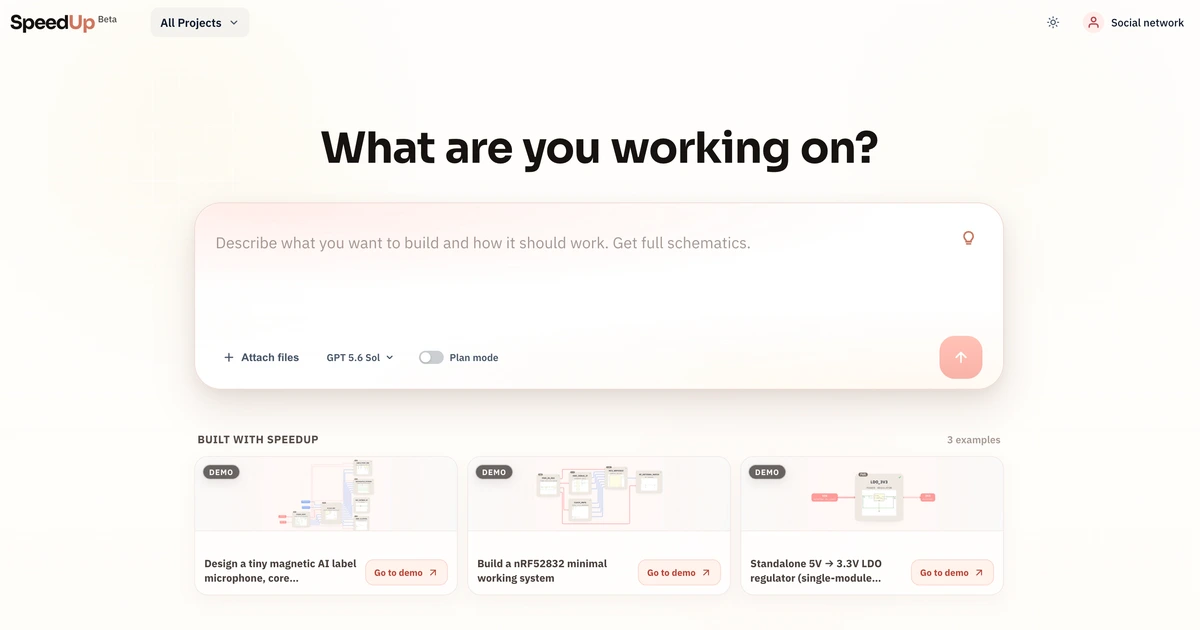
SpeedUp AI is an AI schematic generator that turns plain-language product requirements into editable KiCad circuit projects. Describe what your device must do and SpeedUp structures the requirements into electronics modules, builds module-level schematic sheets from real, sourceable components, and packages everything as a downloadable KiCad project you can open immediately. The output is a first draft for engineering review, not a replacement for it.
Why SpeedUp AI works
Starting a hardware schematic from scratch means translating a product goal into functional blocks, mapping those to circuits, picking components, drawing nets, and running electrical checks, often before any production hardware exists. SpeedUp runs the translation step: it produces a block-level architecture and module-level schematic sheets from a product brief, so the engineer starts with a structured, editable draft to inspect and refine rather than a blank canvas. The output opens in KiCad with local symbol and footprint libraries included.
SpeedUp AI features
- Product brief to circuit architecture. Describe what the device must do in plain language: functions, power, interfaces, and preferred parts. SpeedUp structures those requirements into electronics modules, power rails, and signal interfaces before generating any schematic detail.
- Hierarchical schematic sheets by module. Each functional block (power, compute, display, sensing, user interaction) becomes its own KiCad schematic sheet in a hierarchy, keeping the design organized and easy to review or edit section by section.
- BOM draft from sourceable parts. Component selections draw from real, sourceable parts and land in a BOM draft alongside the schematic, giving the engineer a starting point for procurement and component validation.
- Editable KiCad project export. The complete output is an editable .kicad_pro project with .kicad_sch hierarchy sheets and local symbol and footprint libraries. It opens immediately in KiCad for inspection, refinement, and engineering sign-off.
- Three input types, one workflow. Start from a behavior brief, a selected component stack with named parts, or defined design constraints such as a target board and pin map. All three produce the same reviewable architecture and editable KiCad starting point.
Who SpeedUp AI is for
- Hardware startup founders who need a concrete schematic draft before hiring a senior EE, so early engineering conversations start from something reviewable rather than a blank whiteboard.
- Electronics engineers who want to cut the block-diagram and first-draft phase down from days to minutes before moving into detailed design review.
- Independent hardware consultants quoting fixed-fee prototype work who want a faster path from product brief to a structured draft schematic the client can inspect.
- Makers and small-batch product builders who can read and edit schematics but find drawing from scratch slow and want a reviewable starting point fast.
Similar micro SaaS ideas you can build
- PCB layout copilot. Tool for hardware engineers that takes a finished schematic and proposes a first-pass board layout with component placement and routing for review in KiCad, sold per project.
- BOM optimizer. Service for hardware teams that reads a schematic BOM and proposes lower-cost or in-stock component substitutions from live distributor inventory, billed per BOM run.
- Firmware skeleton generator. Tool that reads a KiCad schematic and emits a starter firmware project with pin definitions and HAL setup for the chosen MCU, sold per board bring-up.
- Datasheet parser. Micro SaaS that ingests a component PDF datasheet and outputs a machine-readable spec with pinout tables, application circuits, and electrical characteristics, sold per document processed.