What is LocalChat.app?
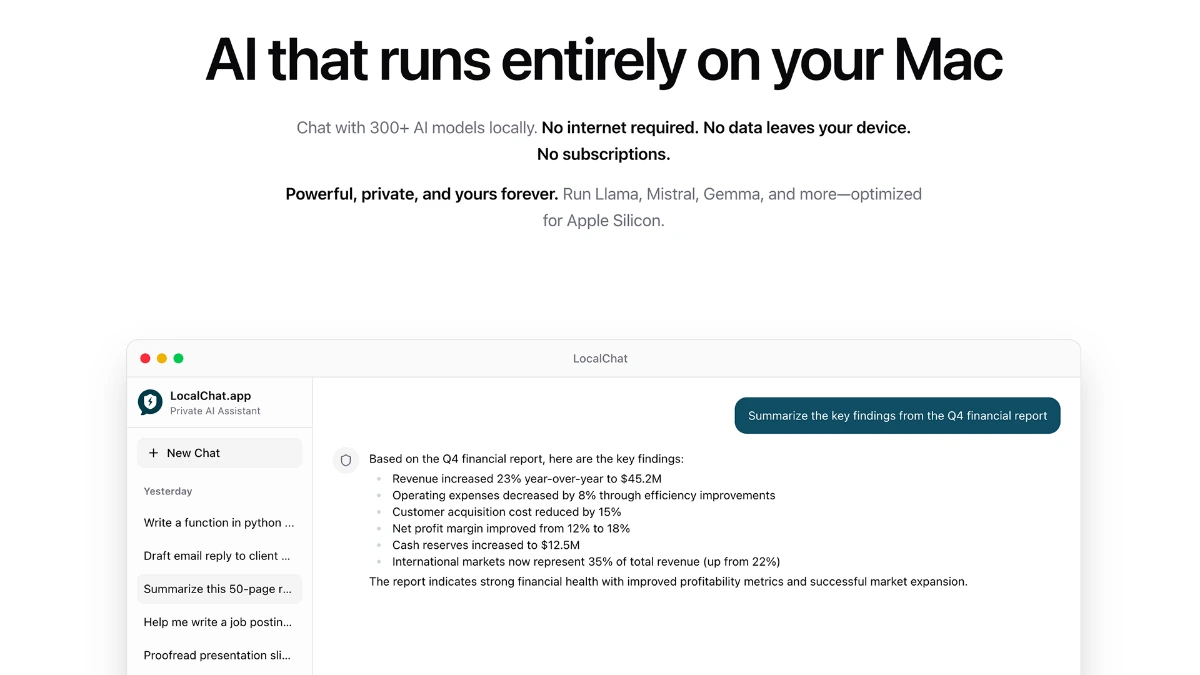
LocalChat is a macOS app that runs open-source AI models locally on Apple Silicon Macs with no account, no telemetry, and no cloud dependency. It is built for legal consultants, software engineers, product designers, and anyone handling confidential material who does not want prompts crossing a vendor's server. Users browse and download from 300+ GGUF models (Llama, Mistral, Gemma, Qwen, DeepSeek) and chat with PDFs, codebases, and images offline.
Why LocalChat.app works
Cloud AI tools log prompts and reserve the right to train on them, which rules them out for client work under NDA. LocalChat runs every prompt on the user's own M-series Mac with encrypted local storage and zero telemetry, so a contract lawyer or a security engineer can use a capable model without any data ever leaving the device.
LocalChat.app features
- On-device inference. Runs every prompt locally on Apple Silicon so conversations never leave the user's Mac.
- Built-in model manager. Lets users browse 300+ open-source GGUF models including Llama, Mistral, Gemma, Qwen, and DeepSeek, and switch between them with one click.
- Document chat. Accepts dragged-in PDFs, text files, and codebases for retrieval-style conversations over local files.
- Image analysis. Supports analyzing dropped images alongside text prompts.
- No account or telemetry. Starts working without a login and ships with zero chat telemetry and zero in-app tracking.
- Offline operation. Works fully offline once a model is downloaded so users can keep working on a plane or in a secured facility.
Who LocalChat.app is for
- Legal consultants drafting and reviewing privileged client documents who cannot send text to a third-party LLM under retainer rules.
- Software engineers at large companies who want a coding assistant on their work Mac without leaking proprietary code to a vendor.
- Product designers exploring concepts who want a no-account assistant that does not retain chat history on a remote server.
- Security and compliance professionals at firms with strict data-handling policies who need a local-only AI option to recommend to staff.
Similar micro SaaS ideas you can build
- Local code review buddy. Mac app for engineering teams that runs a local model against a private repo and produces PR-level review comments without sending code to the cloud, sold per seat.
- Offline doctor's note assistant. Local AI app for clinicians that drafts visit summaries from dictation entirely on-device for HIPAA-friendly small practices, priced per provider.
- Field journalist transcriber. Mac app for journalists in restricted regions that transcribes and summarizes interview recordings fully offline so source content is never uploaded, sold as a lifetime license.
- Bar-prep AI tutor offline. Local AI app for bar candidates that runs over downloaded outlines and practice essays without an internet dependency, sold per exam cycle.