What is init.Habits?
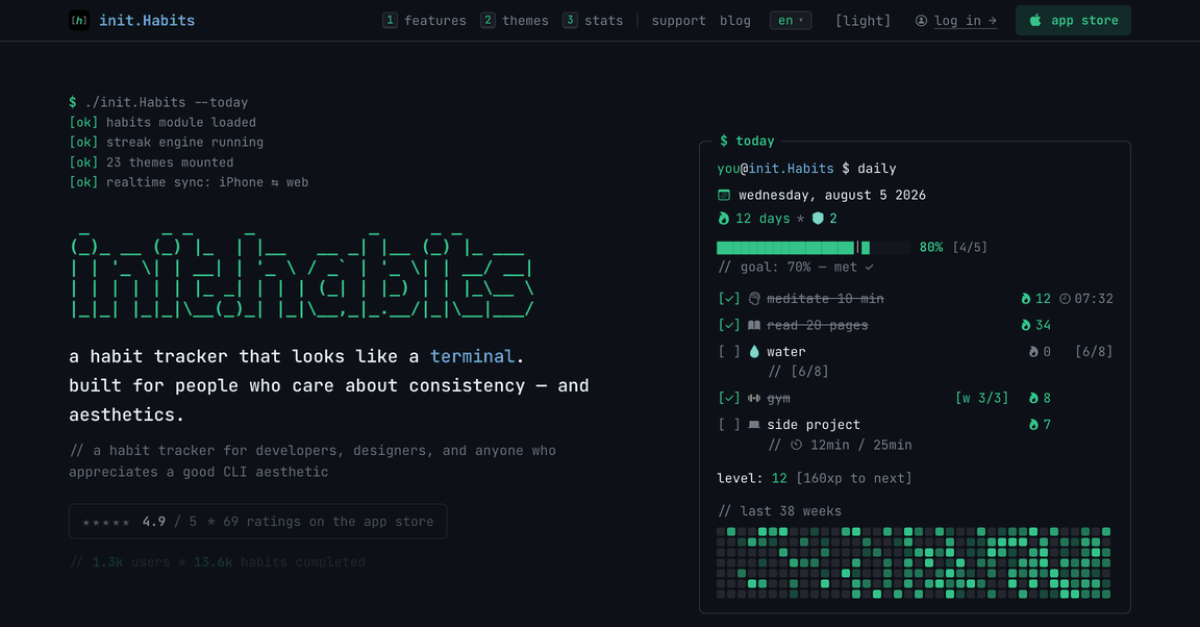
init.Habits is a terminal style habit tracker for developers, designers, and people who prefer quiet tools. It supports checkbox, counter, number, timer, and Apple Health linked tracking, plus routines, reminders, widgets, and flexible schedules. The full tracker runs on iPhone and the web, with real time sync between them. Free users can track up to 10 habits and 2 routines.
Why init.Habits works
A single missed day can make a long streak feel pointless, which is a poor fit for routines that have to survive real life. init.Habits earns shields from completed days and spends one automatically when a day is missed, while vacation and sick modes can pause tracking. It keeps the chain honest through interruptions instead of turning one bad day into a reset.
init.Habits features
- Streak shields. Every 7 days of hitting your goal earns a shield, up to 3. Miss a day and one is spent automatically so the streak survives. Vacation and sick modes can pause tracking without spending one.
- Five tracking modes. Track simple completions with checkboxes, quantities with counters or numbers, focused time with the Pro timer and Pomodoro, or 11 supported Apple Health metrics with Pro.
- iPhone and web sync. The full tracker runs on iPhone and the web. Cloud Sync keeps habits and streaks aligned in real time, and Pro bought on either platform unlocks both.
- Routines and flexible schedules. Bundle habits into named routines with one reminder and a shared progress counter. Schedules support daily, weekly, biweekly, monthly, start and end dates, backfill, and weekly targets.
- Themes and widgets. Free includes 8 themes and the checklist widget. Pro unlocks all 23 editor themes, the custom theme editor, custom fonts, app icons, and every widget.
Who init.Habits is for
- Developers who want a habit tracker that feels closer to an editor or terminal than a wellness app.
- Designers who care about visual customization and want their habit tracker to match editor inspired themes.
- People tracking mixed goals such as water, workouts, timed focus, or weekly routines that do not fit a single checkbox.
- People who move between iPhone and a browser and want the same habits and streaks on both.
Similar micro SaaS ideas you can build
- Client retainer cadence tracker. A delivery tracker for solo consultants managing recurring promises across clients. Set weekly or monthly commitments, pause expectations during planned leave, and keep a history of what was actually delivered.
- Home exercise program log. A progress tool for physical therapy clinics where assigned exercises can be measured by repetitions, minutes, or completion. Patients record each session while clinicians see weekly consistency without treating every missed day as a total reset.
- Recurring QA runbook tracker. A lightweight tool for small software teams to bundle repeated production checks into release, weekly, or monthly runbooks. It records each completed check and keeps a history so recurring operational work does not depend on memory.