What is InterSub?
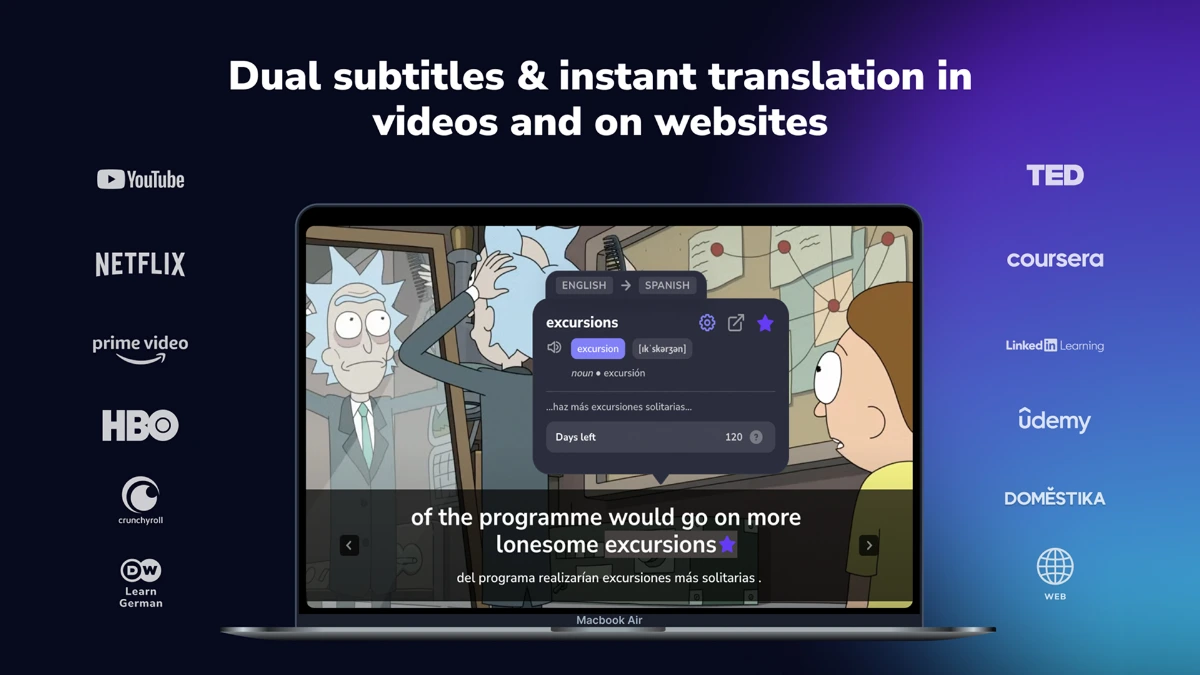
InterSub is a browser extension that shows dual subtitles and on-hover translations on streaming and learning sites for language learners. The page lists support for YouTube, Netflix, Prime Video, HBO Max, Crunchyroll, TED, Coursera, Udemy, and LinkedIn Learning, along with over 30 supported translation languages and Chrome, Edge, and Firefox compatibility. Features include a personal wordbook, AnkiDroid sync, Telegram bot review, and AI explanations for idioms and slang.
Why InterSub works
Watching content in a target language usually means pausing to look up words, then losing the thread of the scene. InterSub keeps both subtitles visible at once and exposes definitions on hover, so learners stay in the show while still capturing the vocabulary that matters, with saved words flowing into Anki or Telegram for later review.
InterSub features
- Dual subtitles on streaming sites. Original and translated subtitles appear together on Netflix, YouTube, Prime Video, HBO Max, and other supported platforms.
- Hover-to-translate words. Word definitions and context translations appear on hover so learners can stay inside the show.
- Personal wordbook. Saved words land in a personal wordbook with options to sync to AnkiDroid or export to Excel for review.
- AI explanations. An AI layer explains idioms, slang, and nuance for phrases that simple dictionary lookups miss.
- Cross-device review. A Telegram bot lets learners review saved words on their phone away from the desktop.
- Pause-only subtitles. Subtitles can be set to appear only when the video is paused, useful for active practice.
Who InterSub is for
- Self-taught language learners watching Netflix in Spanish or Japanese who want to acquire vocabulary in context without pausing every minute.
- Coursera and Udemy students taking technical courses in their second language who need subtitles in both source and native language.
- Anime fans on Crunchyroll learning Japanese who want hover translations plus idiom explanations for slang.
- International professionals improving English through TED talks who want to save unfamiliar phrases for spaced-repetition review.
Similar micro SaaS ideas you can build
- Podcast learner with synced transcripts. An app for language learners that pairs podcasts with dual-language transcripts and Anki export, sold per language pack.
- Subtitle generator plus learner mode. A tool that generates accurate subtitles for video files plus highlights B2-level vocabulary for learners, billed per hour processed.
- Reading immersion for ebooks. A Kindle and Kobo plugin that shows hover translations and saves words to a review queue, sold per learner.