What is EnhancePhoto AI?
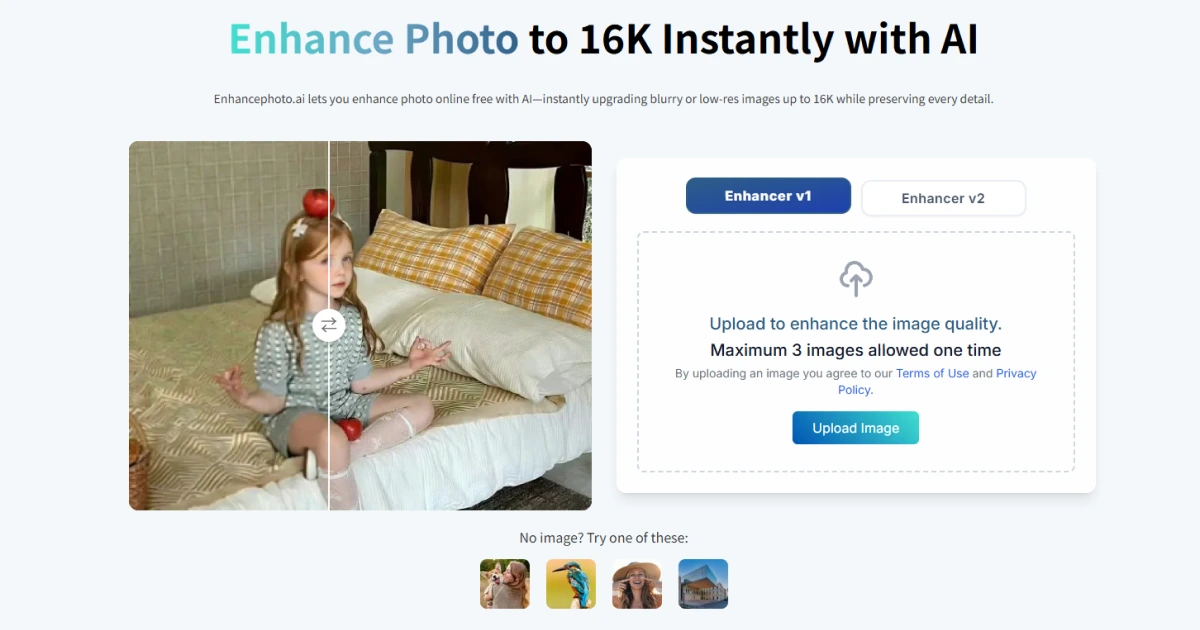
EnhancePhoto AI is a free, browser-based image enhancer that upscales photos to 2K, 4K, 8K, or 16K using AI detail reconstruction, with no sign-up and no watermarks. The page lists fast processing in under 10 seconds per image, cross-device access from PC, Mac, tablet, and smartphone browsers, and post-processing deletion of uploaded files. It handles upscaling, blur-to-clear conversion, noise removal, and old photo restoration.
Why EnhancePhoto AI works
Most photo enhancers either watermark output, paywall higher resolutions, or produce the over-smoothed plastic look that defeats the point of detail recovery. EnhancePhoto keeps high-resolution exports free and uses element-aware processing for hair, fabric, and skin, so the enhanced result still reads as a photograph rather than an oil painting.
EnhancePhoto AI features
- Up to 16K upscaling. Outputs can reach 2K, 4K, 8K, or 16K resolution, useful for prints, large-format displays, or restored archival use.
- Element-aware detail recovery. Hair, fabric, and skin are recognized as different elements so each is enhanced without the overall plastic look.
- Old photo restoration. Restores faded or damaged photos by recovering color and sharpness without manual editing.
- Fast processing. Most images return in under 10 seconds, fitting one-off cleanup of family or product photos.
- No watermarks or sign-up. Output files are unbranded and the page states no registration is required, lowering the barrier to occasional use.
Who EnhancePhoto AI is for
- Family historians scanning old family photos who want to recover color and detail without learning Photoshop.
- Small e-commerce sellers improving low-resolution product shots before listing on Amazon or Etsy.
- Print-on-demand creators upscaling source art to a resolution that prints cleanly on canvases and posters.
- Social media managers restoring archival brand photos for retrospective posts or anniversary campaigns.
Similar micro SaaS ideas you can build
- Archival photo digitizer. A service for families that bulk-restores scanned photo albums and ships a high-resolution archive plus prints, sold per album.
- Listing image refresher for Amazon sellers. A SaaS that upgrades older product listings in bulk to current high-resolution standards, billed per SKU processed.
- Real estate photo cleanup. A tool for solo realtors that brightens, sharpens, and corrects exposure on phone-shot listing photos, sold per listing.