What is CUBE?
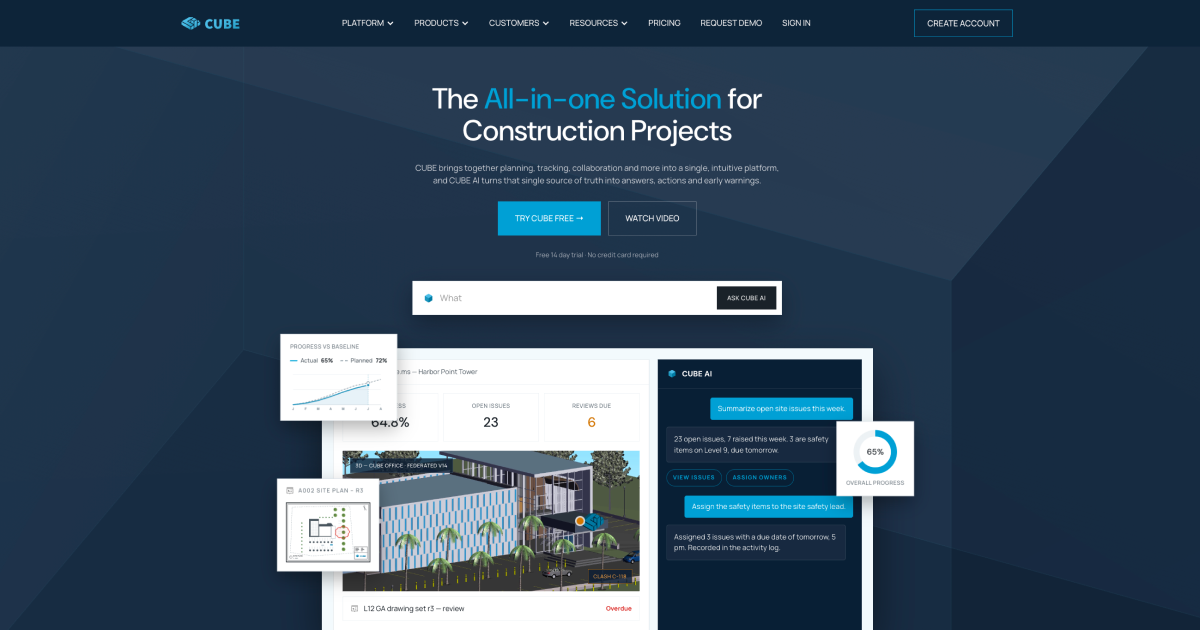
CUBE is a construction project platform for architects, contractors, engineers and owners managing design, delivery and operations. It combines a common data environment, project management and digital twins, with CUBE AI able to answer questions across project data, prepare actions for approval and flag schedule or cost risks. Every portal includes unlimited projects, spaces, storage and version history, with more than 60 file formats viewable in the browser.
Why CUBE works
Construction control breaks down when drawings, schedules, costs, approvals and site issues sit in separate systems that teams have to reconcile by hand. CUBE keeps those records together and gives its AI the same permission controlled project context, so teams can ask questions, prepare actions and spot risks from the record they already work in. The team acts on one governed project record instead of rebuilding the truth across disconnected tools.
CUBE features
- One project record. The Common Data Environment keeps files, issues, reviews, tasks and transmittals together with role based access, while unlimited version history preserves previous records.
- Time and cost controls. Project Management covers schedules, estimates, progress updates, contracts, bills and change orders, letting teams track delivery against the same project data.
- Browser based BIM and CAD review. Teams can federate BIM models, compare CAD revisions, measure drawings, redline files and review PDFs without desktop viewing software. More than 60 formats can be opened in the browser.
- AI with approval controls. CUBE AI can answer from files, tasks, costs and schedules, draft project records and flag slippage or cost risks. It does not create, send or change records until a user approves the action.
- Custom workflows and connections. Teams can create custom modules with the no code module builder, while platform connections include Microsoft Project, Primavera P6, Power BI, SAP, Oracle and an open API.
Who CUBE is for
- Architects coordinating multidisciplinary models, design reviews, revisions and approvals with owners, contractors and consultants in one workspace.
- Contractors tracking schedules, field progress, drawings, quantities, change orders and subcontractor coordination across complex construction projects.
- Project teams that need a governed common data environment for documents, approvals, tasks and communication across multiple organizations.
- Asset owners carrying drawings, models, asset registers, procedures and maintenance records from construction into operations through a digital twin.
Similar micro SaaS ideas you can build
- Clinical trial coordination for small research teams. A workspace that connects protocols, site documents, approvals, milestones and open issues, then surfaces which missing decision or delayed task is putting the next study milestone at risk.
- Manufacturing change control for hardware teams. A tool that links drawings, supplier documents, approvals, schedules and change requests so teams can see how one engineering revision affects purchasing, production and delivery before releasing it.
- Event production control for complex live shows. A shared record for venues, vendors, schedules, technical plans, approvals and last minute changes, with alerts when one unresolved dependency threatens rehearsals, setup or show day.